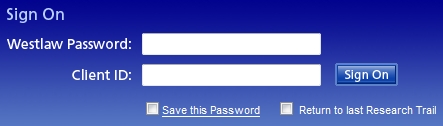
The first page that appears when you visit Westlaw is the SIGN-IN page. The Sign-in box looks like this:
When working for a law firm, the process for signing on may differ slightly, but for this class, do the following:
1. Type the PASSWORD that you are provided.
2. Type the CLIENT ID. Usually this would be the client for whom you are researching. So type in your client's name or client number (that you have made up). This way Westlaw tracks the amount of time you spend researching for a client so the client can later be billed.
3. Click the SIGN-ON button.
If you want, Westlaw can remember your Password. Simply click the box below the Client ID box.
After successfully logging in, Westlaw may ask you to agree to conditions of use. Click that you agree.
You will now be looking at the main page for Westlaw. Before we start researching, we will first set up our site to our liking. To learn how to do this, just click on the "Preferences" link on the left column of this Lab.